
Appearance
Quick Capture
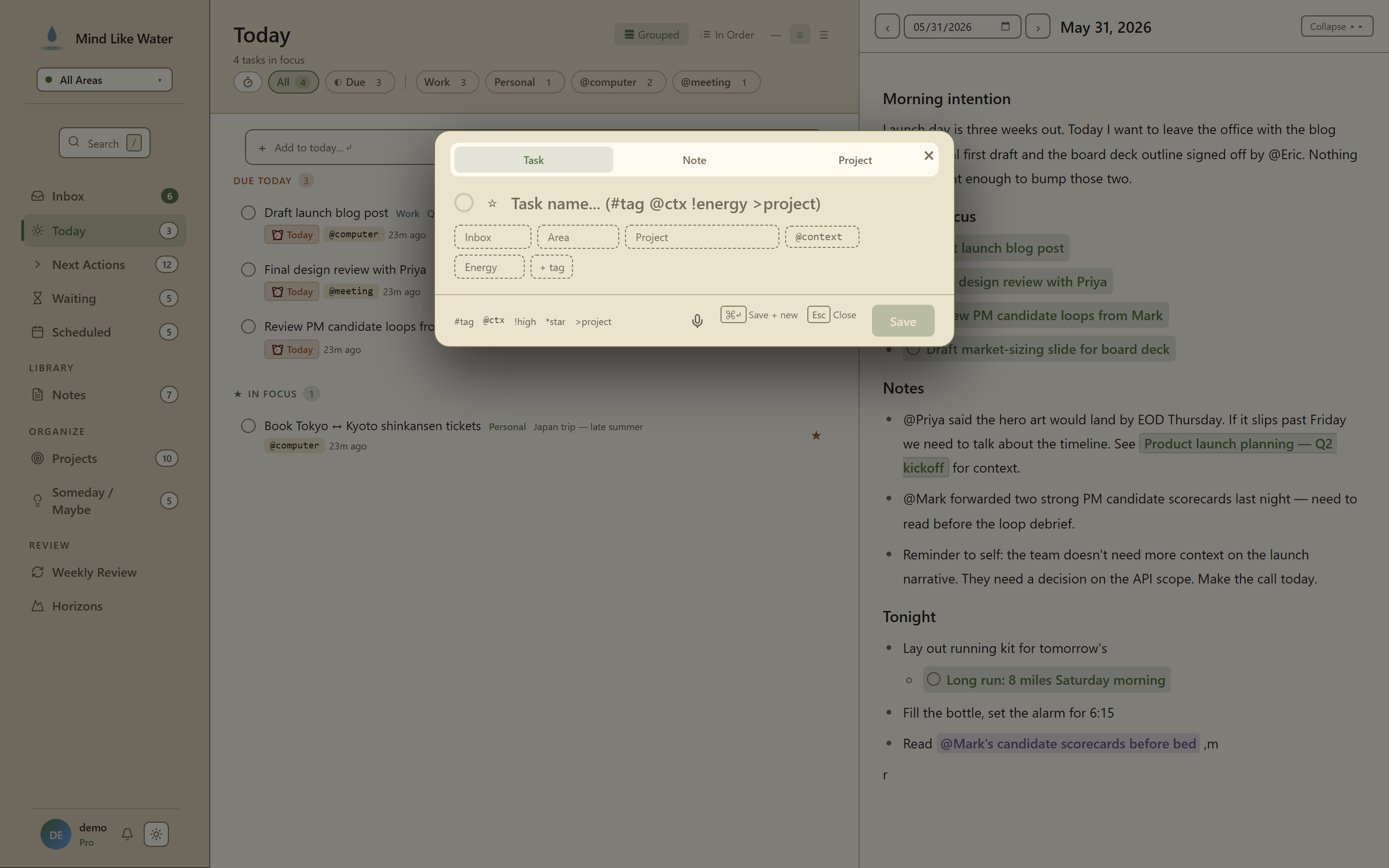 Quick Capture: three tabs (Task / Note / Project), chip pickers for the most common metadata, and a smart-syntax legend at the bottom.
Press n anywhere to open the Quick Capture modal. Three tabs — Task / Note / Project — with chip pickers for the most common metadata, plus a smart-syntax parser so you can pre-fill chips from inline notation in the title field.
The goal: zero-friction capture when you don't want to context-switch into a list view first.
The modal
| Tab | What it captures |
|---|---|
| Task | Title, status, area, project, tags, context, energy. Lands in Inbox by default; pre-set a Status chip to skip the inbox. |
| Note | Title + area + project. Lands in your Notes inbox if you don't set an area or project; otherwise filed where you set it. |
| Project | Project name + outcome + area. Creates the project ready for tasks to be added. |
Pressing n always opens to the Task tab unless you call it from a Note context (where it opens to Note).
Smart-syntax parser
You can type chip values inline in the Task tab's title field — the parser extracts them and clears them from the title before saving. Useful when your hands are already typing a fast capture and you don't want to break flow to click chips.
| Syntax | Sets |
|---|---|
#topic | Tag (creates the tag if new) |
@phone / @home / @errands etc. | Context (only matches known contexts; otherwise treated as text) |
!high / !medium / !low (or !med) | Energy level |
* | Stars the task (adds to Today) |
>project | Project (typeahead match against your existing projects by partial name) |
~30min / ~1h / ~1.5hr | Estimated duration |
[15m] / [30min] / [1h] | Same as ~ form (alt syntax) |
3pm / 9 AM / 10:30am | Due time (sets due_date to today, due_time to the parsed value) |
Combinable in a single capture:
Doctor visit 3pm tomorrow ~30min @phone *→ Title "Doctor visit", due tomorrow at 3pm, estimated 30 min, context phone, starred.
The chip pickers
Below the title field, every chip is keyboard-navigable:
- Status — radio: inbox / active / waiting / someday
- Area — picker; defaults to the active Area of Focus
- Project — typeahead: type a few letters to match a project by partial name
- Tags — multi-select with create-new-on-Enter
- Context, Energy — same dropdowns as the detail pane
Picking a value auto-advances focus to the next chip, so you can keyboard your way through Title → Status → Project → Area → Save without touching the mouse.
Saving
| Shortcut | Action |
|---|---|
Enter | Save and close |
Cmd+Enter / Ctrl+Enter | Save and keep the modal open for rapid-fire captures (clears title, keeps chip selections) |
Esc | Cancel without saving |
The "save and keep open" mode is the trick for end-of-day brain dump or weekly review processing — you can fire 20 quick captures into Inbox without re-opening the modal each time.
Voice capture vs Quick Capture
Shift+N opens Voice capture instead. Use voice for stream-of-consciousness brain dumps where you'd type slower than you talk; use Quick Capture for deliberate single-item entries with structured metadata.
Inbox capture bar (faster for inbox-only)
If all you want is a title-only inbox dump, the Inbox view has an always-visible capture input at the top. Press i to jump there, type, Enter to save, the input stays focused for the next one. No modal, no chips, just title-and-go. See Capture for the full GTD flow.
Keyboard shortcut
| Shortcut | Action |
|---|---|
n | Open Quick Capture (Task tab) |
Shift+N | Open Voice capture |
i | Jump to Inbox (where the always-visible inbox capture bar lives) |
What Quick Capture doesn't do
- Doesn't set due dates from inline syntax other than time literals.
tomorrowwon't parse to a due_date. Use the chip picker for dates. - Doesn't capture attachments. Drop a file in a note after creating it instead.
- Doesn't open in mobile gestures yet — on mobile, tap the capture FAB instead of using a keyboard shortcut.
Related
- Voice capture — Shift+N for the dictation alternative
- Inbox — where un-classified captures land
- Capture — the GTD-flow context for all capture paths